What Is an Instagram Font Generator?
An instagram font generator is an online tool that converts plain text into stylish Unicode characters. These characters look like different fonts but are actually special symbols that Instagram supports.
Unlike traditional fonts you install on your device, Instagram doesn’t allow custom font uploads. Instead, font generators use Unicode—a global character system—to create text that looks decorative but remains readable across platforms.
How Instagram Text Formatting Works
Instagram uses a standard text system. When you type in your bio or caption, it supports Unicode characters. That means if you copy stylized text from a font generator, Instagram will display it properly.
Unicode Characters Explained
Unicode is a universal character encoding standard. It includes thousands of symbols, letters, and characters. Font generators simply replace normal letters with similar-looking Unicode versions.
Many people think Instagram font generators actually change the font style. In reality, they do not modify the font itself. Instead, they convert normal text into special Unicode characters that look like stylish fonts.
Unicode is a universal text standard that assigns a unique code to every letter, number, symbol, and emoji. Because these characters are supported by most devices and platforms, you can copy and paste them directly into Instagram bios, captions, usernames, and comments.
Example
Normal Text:
Converted Stylish Unicode Text:
𝓜𝓸𝓱𝓭 𝓚𝓱𝓪𝓷
𝗠𝗼𝗵𝗱 𝗞𝗵𝗮𝗻
𝙈𝙤𝙝𝙙 𝙆𝙝𝙖𝙣
🅼🅾🅷🅳 🅺🅷🅰🅽
Why Unicode Fonts Work on Instagram
- They are supported by most social media platforms.
- They can be copied and pasted easily.
- No special app or installation is required.
- They work on mobile devices and desktops.
You can learn more about Unicode standards at the official Unicode website: Official Unicode Website
Why Stylish Fonts Matter on Instagram
Let’s be honest—Instagram is visual. And your text is part of that visual appeal.
Boosting Engagement
Creative fonts catch attention. When users pause longer on your profile, engagement increases. And the algorithm loves engagement!
Strengthening Brand Identity
If you're a brand or influencer, consistent font styling can become part of your identity. Think of it like a digital signature.
Standing Out in the Feed
With millions of posts daily, differentiation is key. Stylish fonts make captions pop and bios unforgettable.
How an Instagram Font Generator Works
The process behind an Instagram font generator is surprisingly simple.
Copy and Paste Technology
- Enter your text.
- The tool converts it into multiple font styles.
- Copy your favorite version.
- Paste it into Instagram.
Mobile vs Desktop Use
Most generators work smoothly on both devices. However, always double-check formatting after pasting—especially in your bio.
Best Features to Look for in an Instagram Font Generator
Variety of Text Styles
- Script fonts
- Bold styles
- Bubble letters
- Small caps
- Glitch effects
Emoji and Symbol Integration
Many generators include decorative symbols like stars, arrows, and hearts.
- Stars ✨
- Arrows ➜
- Hearts ❤
- Dividers ────
- These enhance aesthetics.
Compatibility Across Devices
Make sure text displays correctly on iPhone, Android, and desktop browsers.Testing prevents awkward formatting issues.
Step-by-Step Guide to Using an Instagram Font Generator
Instagram is one of the most competitive social media platforms. Millions of users try to make their profiles unique. One simple way to stand out is by using stylish fonts in your bio, captions, or username. An Instagram font generator helps you convert normal text into cool and fancy fonts instantly.
In this guide, you’ll learn exactly how to use an Instagram font generator step-by-step.
Step 1: Open an Instagram Font Generator
First, open a reliable font generator website. One of the easiest tools is:
This tool converts normal text into hundreds of stylish fonts instantly.
Step 2: Type Your Text
After opening the tool, type your text in the input box. For example:
Mohd Khan
Instagram King
Gaming Legend
The generator will automatically convert your text into multiple stylish fonts.
Step 3: Choose Your Favorite Font Style
Scroll through the generated styles and select the one you like the most.
𝓜𝓸𝓱𝓭 𝓚𝓱𝓪𝓷
𝕄𝕠𝕙𝕕 𝕂𝕙𝕒𝕟
𝙈𝙤𝙝𝙙 𝙆𝙝𝙖𝙣
🅼🅾🅷🅳 🅺🅷🅰🅽
Different fonts create different vibes for your profile.
Step 4: Copy the Stylish Font
Once you find a font you like, simply click or copy the text. Most generators allow one-click copy.
Step 5: Paste It on Instagram
Now open Instagram and paste the copied text in:
- Instagram Bio
- Instagram Username
- Instagram Captions
- Instagram Comments
💡 Want unique usernames? Try our free username generator.
Your profile will instantly look more stylish and unique.
For more creative styles, you can also try our Blue Name Generator for colored names, Japanese Bio Generator for aesthetic bios, and Free Fire Stylish Name Generator for gaming nicknames.
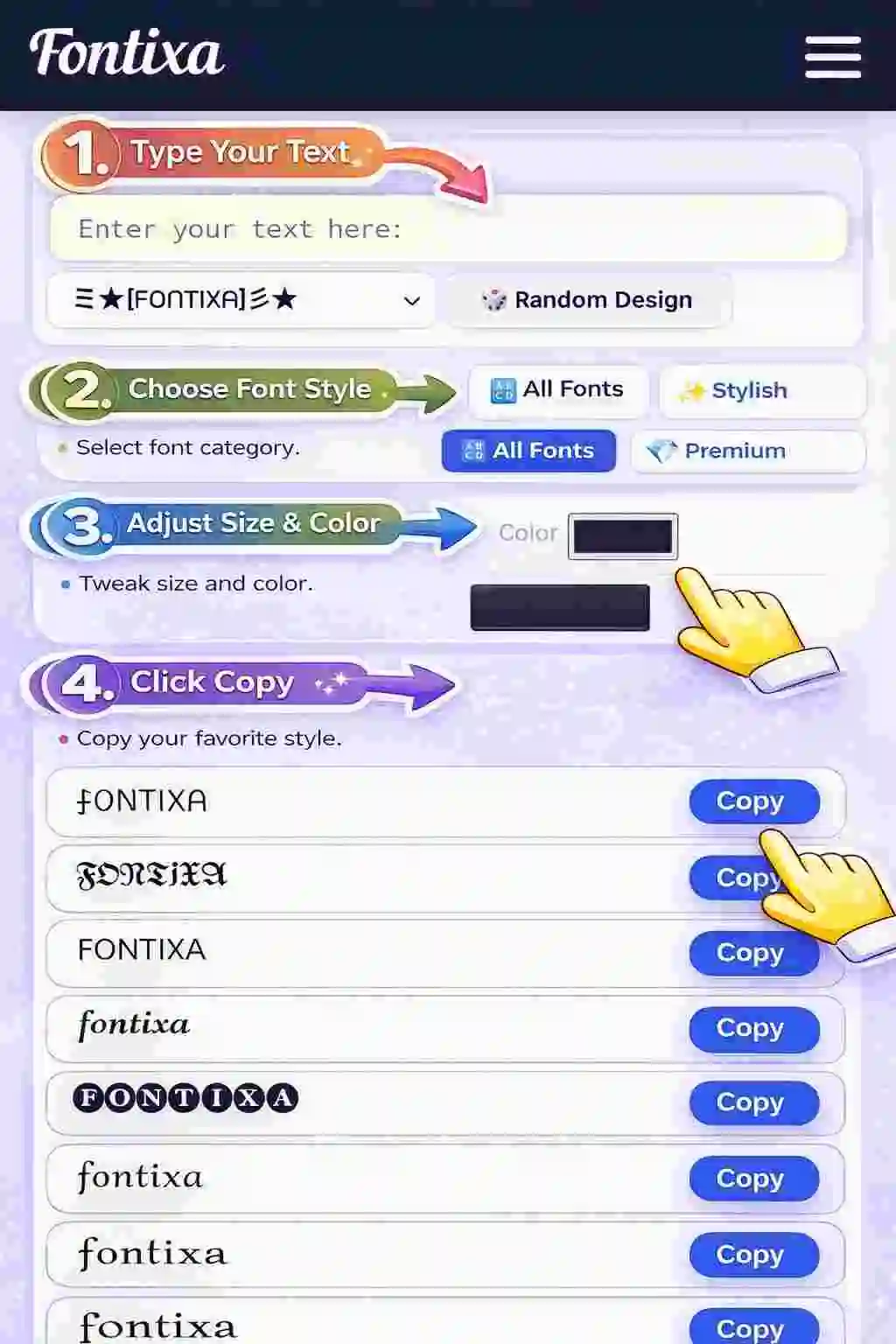
Step-by-step guide to creating stylish fancy names using Fontixa fancy Name Generator.
Example Instagram Stylish Bio
✨ Dream Big | Work Hard
🔥 Born to Stand Out
🎮 Gamer | Creator | Explorer
💫 𝓛𝓲𝓿𝓲𝓷𝓰 𝓜𝔂 𝓢𝓽𝔂𝓵𝓮
Final Thoughts
Using an Instagram font generator is one of the easiest ways to make your profile more attractive and eye-catching. It takes only a few seconds but can significantly improve your profile appearance and engagement.
Try creating your own stylish text here:
Formatting Captions with Stylish Fonts
When using an Instagram font generator, it’s important to format your captions properly. Stylish fonts can make your content stand out, but using too many fancy fonts can make the text difficult to read.
For the best results, use stylish fonts only for important words or phrases while keeping the rest of the caption in normal text. This keeps your caption clean, attractive, and easy to understand.
Example
Normal Caption:
Just finished an amazing workout today. Feeling strong and motivated!
Stylish Caption (Better Formatting):
Just finished an amazing workout today. Feeling 𝙎𝙩𝙧𝙤𝙣𝙜 and 🔥 𝙈𝙤𝙩𝙞𝙫𝙖𝙩𝙚𝙙 🔥!
Enhancing Story Highlights with Stylish Fonts
Instagram Story Highlights are one of the first things visitors notice on your profile. Using stylish fonts in your highlight titles can make your profile look more professional and visually appealing.
When you combine custom fonts with matching highlight covers, it creates a clean and branded appearance. This helps your profile stand out and makes navigation easier for your followers.
Example Highlight Titles
✨ 𝓣𝓻𝓪𝓿𝓮𝓵
📸 𝓜𝔂 𝓛𝓲𝓯𝓮
🔥 𝓕𝓲𝓽𝓷𝓮𝓼𝓼
🎮 𝓖𝓪𝓶𝓲𝓷𝓰
Popular Font Styles for Instagram
Cursive & Script Fonts
Cursive and script fonts give a soft, elegant, and aesthetic look to your text. These fonts are especially popular among lifestyle bloggers, fashion creators, and influencers who want their profiles to look stylish and sophisticated.
Perfect for lifestyle bloggers and fashion accounts because they create a personal and artistic vibe.
𝓕𝓪𝓼𝓱𝓲𝓸𝓷 𝓠𝓾𝓮𝓮𝓷
𝓛𝓲𝓯𝓮𝓼𝓽𝔂𝓵𝓮 𝓑𝓵𝓸𝓰
𝓢𝓽𝓪𝔂 𝓢𝓽𝔂𝓵𝓲𝓼𝓱
𝓓𝓻𝓮𝓪𝓶 • 𝓒𝓻𝓮𝓪𝓽𝓮 • 𝓘𝓷𝓼𝓹𝓲𝓻𝓮
Bold & Aesthetic Fonts
Bold and aesthetic fonts are powerful and attention-grabbing. They work perfectly for motivational pages, business profiles, and personal brands that want to appear confident and professional.
Ideal for motivational pages and business accounts because these fonts highlight important words and create a strong visual impact.
𝙉𝙚𝙫𝙚𝙧 𝙂𝙞𝙫𝙚 𝙐𝙥
𝗦𝘂𝗰𝗰𝗲𝘀𝘀 𝗠𝗶𝗻𝗱𝘀𝗲𝘁
🔥 𝐁𝐞 𝐁𝐫𝐚𝐯𝐞
⚡ 𝘉𝘶𝘪𝘭𝘥 𝘠𝘰𝘶𝘳 𝘌𝘮𝘱𝘪𝘳𝘦
Minimalist & Clean Fonts
Minimalist and clean fonts focus on simplicity and readability. These fonts look modern, elegant, and professional without being overly decorative.
Great for professional brands, consultants, entrepreneurs, and creators who want their Instagram profile to look clean and trustworthy.
𝙈𝙤𝙝𝙙 𝙆𝙝𝙖𝙣
𝗗𝗶𝗴𝗶𝘁𝗮𝗹 𝗖𝗿𝗲𝗮𝘁𝗼𝗿
Simple • Clean • Professional
𝐁𝐮𝐢𝐥𝐝 𝐘𝐨𝐮𝐫 𝐁𝐫𝐚𝐧𝐝
Instagram Font Generator for Businesses & Influencers
Branding Strategies
Using stylish fonts consistently can strengthen your personal or business branding on Instagram. When followers recognize your font style, it creates a memorable and professional identity.
- Use one consistent font style across your bio, captions, and highlights.
- Match fonts with your brand colors for a cohesive profile look.
- Avoid switching styles frequently to maintain brand recognition.
Call-to-Action Optimization
Stylish fonts can make your call-to-action (CTA) more noticeable and increase engagement. When users see visually appealing text, they are more likely to click or interact.
Stylized CTAs like:
➜ 𝒞𝓁𝒾𝒸𝓀 𝓉𝒽𝑒 𝐿𝒾𝓃𝓀
➜ 𝒮𝒽𝑜𝓅 𝒩𝑜𝓌
➜ ✨ 𝒮𝑒𝑒 𝑀𝑜𝓇𝑒
➜ 🔥 𝒥𝑜𝒾𝓃 𝒩𝑜𝓌
Safety and Security: Are Font Generators Safe?
Instagram font generators are generally safe because they only convert your text into stylish Unicode characters. They do not require access to your Instagram account or personal data. However, it is important to use trusted tools and avoid suspicious websites.
Avoiding Spam Tools
Some websites may contain spam or unsafe features. Before using a font generator, watch for these warning signs:
- Mandatory logins or requests for your social media account details
- Excessive ads or pop-ups that redirect to unknown pages
- Download requirements for apps or files just to generate fonts
Trusted Platforms
Always use reputable websites that work directly in your browser and have HTTPS security. Secure platforms allow you to simply type text, copy stylish fonts, and paste them into Instagram without installing anything.
For example, you can safely generate stylish text using:
Common Mistakes to Avoid When Using Fancy Fonts
Fancy and stylish fonts can make your Instagram bio and captions look unique. However, using them incorrectly can reduce readability and make your profile look messy. To keep your content attractive and professional, avoid these common mistakes.
- Overusing decorative text – Too many fancy characters can make captions difficult to understand.
- Making bios hard to read – If followers struggle to read your bio quickly, they may lose interest.
- Using incompatible fonts – Some rare Unicode characters may not display correctly on all devices.
- Mixing too many styles – Using several different font styles together can make your profile look inconsistent.
Pro Tip
For the best results, choose one or two stylish fonts and use them consistently across your Instagram bio, captions, and highlights.
FAQs About Instagram Font Generator
1. Is an instagram font generator free?
Yes, most tools are free and require no downloads.
2. Do stylish fonts work on all devices?
Generally yes, but some older devices may not display certain characters.
3. Can Instagram ban me for using fancy fonts?
No. Unicode-based fonts follow platform guidelines.
4. Do fancy fonts increase engagement?
They can enhance profile appeal and boost engagement when used wisely.
5. Can I use these fonts in comments?
Yes, you can paste stylized text in comments, bios, captions, and DMs.
6. Do font generators store my data?
Most reputable tools do not store text. Always review privacy policies.
Conclusion: Elevate Your Profile with Confidence
An Instagram font generator is more than just a fun tool—it can be a powerful branding asset. When used strategically, stylish fonts can enhance your Instagram bio, make captions more engaging, and give your profile a unique visual identity.
By choosing the right font styles, highlighting key phrases, and maintaining readability, you can create a profile that looks professional and attractive to your audience.
Remember to keep your content clear, accessible, and consistent. Use stylish fonts to highlight important words—not to overwhelm your message.
You can also explore our tools like Blue Name Generator, Japanese Bio Generator, and Free Fire Stylish Name Generator to create stylish text, bios, and gaming names instantly.